
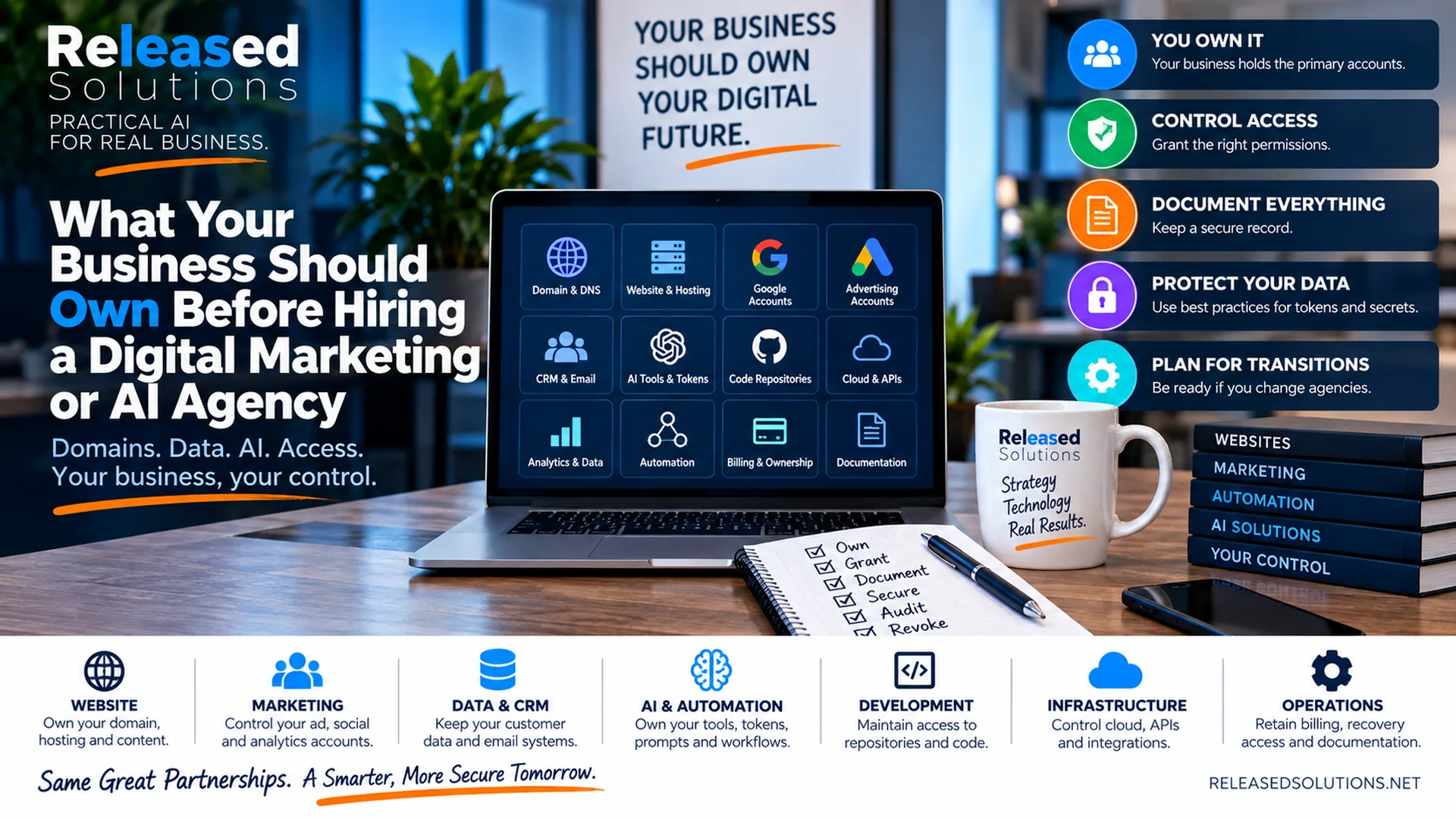

What Your Business Should Own Before Hiring a Digital Marketing or AI Agency
Years ago, the ownership conversation was mostly about domains, websites, hosting, social media accounts and Google properties.
Those things still matter. But the digital infrastructure behind a business has expanded dramatically.
Today an agency may touch your CRM, advertising accounts, analytics, email and SMS systems, automation workflows, cloud hosting, source-code repositories, databases, API integrations, AI projects, service accounts, prompts, knowledge bases and deployment environments.
That creates a new onboarding question: If the agency relationship ended tomorrow, what would your business still control?
A good agency relationship should make your business more capable, not more captive. The goal is not to prevent an agency from having access. Agencies need access to do the work. The goal is to structure ownership so the business holds the primary assets and grants the agency the permissions it needs.
A good agency relationship should make your business more capable, not more captive. Ownership stays with the business. Access is granted to partners for the work they need to do.
Ownership and Access Are Different
This distinction solves much of the confusion.
Ownership means the business controls the primary account, organization, billing relationship, recovery method or underlying asset. Access means another person or company has permission to work inside that asset.
Those should not automatically be the same thing. An agency can manage Google Ads while the business still owns the ad account. A developer can maintain a repository while the repo lives inside a business-controlled GitHub organization. The same rule applies when Claude Code or Cowork works inside your systems: the AI gets access, the business keeps ownership.
That arrangement protects both sides. The agency has the access needed to work. The client has continuity if personnel, vendors or strategies change. The framework I use is straightforward:
OWN the primary asset. GRANT the access an agency actually needs. DOCUMENT what exists and where it lives. SECURE credentials with scoped, rotatable tokens. AUDIT access on a schedule. REVOKE cleanly when the relationship ends or roles change.
Same six moves whether the asset is a domain name, a GitHub organization or an OpenAI project.
Own vs. Access
The business owns the primary account. The agency gets scoped permission to work inside it. Same infrastructure, different responsibility.
Passwords Aren't Enough Anymore
Modern access flows through API keys, tokens, service accounts, OAuth apps and webhooks. The old advice to "get all the passwords" no longer covers it.
Offboarding Starts at Onboarding
Plan how access ends before you grant it. Rotation, revocation and documentation should be part of the original agreement.
10 Domains to Resolve Before Anyone Signs a Contract
The 10 Categories to Resolve Before You Sign
Walk each of the following ten domains before the agency does its first day of billable work. If ownership and access are ambiguous, resolve them now.
DOMAIN, DNS AND CORE WEBSITE INFRASTRUCTURE
Start with the digital property everything else depends on. Your business should know who controls the domain registration, DNS, hosting, CDN, SSL configuration and administrative access. The registrant and recovery information should not depend entirely on an agency employee's personal email. An agency can manage these systems, but losing the agency should not mean losing the ability to point the domain, restore the website or change hosting.
GOOGLE, ADVERTISING AND SOCIAL PLATFORM ACCOUNTS
Businesses should retain control over the accounts where marketing history and audience data accumulate: Google Analytics, Search Console, Tag Manager, Google Ads, Microsoft Advertising, Meta business assets. Do not confuse an agency's manager account with your underlying business account. Historical campaign data and audiences become more valuable over time. If you want a partner running the actual campaigns, that's what our digital marketing / campaign management service is designed for.
CRM, EMAIL, SMS AND CUSTOMER DATA
Customer information deserves even more attention. Your CRM, email platform, SMS platform, ecommerce, appointment platform and other customer databases should be clearly tied to the business. Understand where the data lives, who can export it, who controls billing and what happens to integrations if a vendor is removed. If the agency leaves, your customer history should not leave with it.
SOURCE-CODE REPOSITORIES AND DEVELOPMENT ASSETS
One of the biggest changes from the older version of this conversation. AI-assisted development has made it faster for agencies and contractors to build custom applications, integrations, browser extensions, scripts, dashboards and automations. That makes repository ownership more important, not less. For substantial business-owned projects, the repository should live inside an organization controlled by the business, with developers granted the repository role they need. GitHub supports granular organization repository roles from read through admin. See why I use AI in real project work for what "substantial custom" looks like now.
AI ACCOUNTS, PROJECTS, AGENTS, PROMPTS AND KNOWLEDGE
AI creates an entirely new layer of digital ownership. A business may now depend on AI projects, API usage, custom instructions, prompts, agents, vector stores, files, knowledge bases, model configurations, evaluations or workflows an agency created. OpenAI's API platform, for example, supports organization and project structures, project members, service accounts, API keys, usage tracking and project-level limits. That is much healthier for a production business system than building everything around one developer's personal API key. If your team is still ramping on AI basics, how to learn AI for small business is a good starting point.
API KEYS, TOKENS, SERVICE ACCOUNTS AND SECRETS
Passwords are no longer the whole credential story. Modern systems communicate through API keys, personal access tokens, OAuth applications, service accounts, SSH keys, webhooks, deployment tokens and other secrets. GitHub explicitly recommends treating access tokens like passwords, using fine-grained permissions, limiting repository access, setting expiration and storing credentials securely rather than committing them to repos. OpenAI similarly recommends unique and project-based access rather than sharing personal API keys, with rotation and secure storage.
CLOUD INFRASTRUCTURE, DATABASES AND DEPLOYMENT PLATFORMS
Custom systems often have a second layer beyond the repository. The application may depend on a cloud provider, managed database, serverless functions, object storage, DNS, deployment platform or container registry. Know where production runs. Know where the database lives. Know who controls backups. Know how deployments happen. Know where environment secrets are stored. Know which external APIs are required. And know who is paying for each component. Production infrastructure should not become invisible simply because the business owner is not technical.
AUTOMATION WORKFLOWS AND INTEGRATIONS
Automation platforms can quietly become mission-critical. A workflow may route leads, send notifications, create CRM records, sync purchases, generate reports, update spreadsheets or connect AI services to business systems. If those automations exist only inside an agency-owned account, the business may not even know what stops working when access is removed. Document trigger, connected systems, credentials, business purpose, owner and failure path. For critical automations, the business should control the production workspace or have a clearly defined export plan.
BILLING, RECOVERY AND ADMINISTRATIVE OWNERSHIP
A surprising amount of control comes down to billing and recovery. Who receives the renewal notice? Whose credit card is attached? Which email address receives a password-reset link? Who has two-factor authentication? Who can add or remove administrators? Who owns the organization? Those questions should be answered during onboarding, not during a breakup with an agency. Use role-based access. Avoid unnecessary shared logins. Keep at least one business-controlled recovery path for critical systems.
DOCUMENTATION IS PART OF THE DELIVERABLE
Documentation is not an optional administrative extra. It is part of the system. At minimum, maintain an inventory of critical platforms, business owner/admin, agency access, billing owner, recovery method, repository or project location, integrations, important credentials or where they are securely stored, and offboarding instructions. Do not put raw passwords and API keys into an ordinary spreadsheet. Document where secrets are managed rather than exposing the secrets themselves. Someone new should be able to understand the architecture without reverse-engineering the business from scratch.
Online Presence Readiness Assessment
Is your business ready to market online?
Answer 20 quick questions while we scan your website for tracking, ad pixels, structured data, search basics, speed and contact paths. Get a scored readiness report, free.
The Agency Ownership Reference Table
Use this table as a one-page reference for who owns what and how an agency partner is meant to access it.
| Asset / system | Business should retain | Agency access model |
|---|---|---|
| Domain / DNS | Registrant, recovery, billing, primary admin. | Delegated / admin as needed. |
| Website / hosting / CDN | Primary account or documented recovery path. | Admin or collaborator. |
| Analytics / tags / search | Business-owned properties. | Agency user / manager access. |
| Advertising / social | Underlying business accounts, billing visibility. | Manager / partner roles. |
| CRM / email / SMS | Customer data, billing, export/admin rights. | Role-based access. |
| Code repositories | Business-controlled org for substantial custom work. | Repository role appropriate to the work. |
| AI projects / production resources | Business-controlled org/project, billing, production config. | Project / member / service access. |
| API keys / tokens / secrets | Business-controlled creation, storage and rotation. | Purpose-specific scoped credentials. |
| Cloud / databases / deployment | Production account, billing, backups, recovery. | Role-based technical access. |
| Automation | Production workspace or documented transition/export. | Editor / admin as needed. |
| Documentation | Architecture, integrations, ownership, recovery, offboarding. | Shared operational documentation. |
Credentials Are the New Ownership Surface
Modern access flows through API keys, personal access tokens, OAuth applications, service accounts, SSH keys, webhooks and deployment tokens. Onboarding must cover all of them, not just the login page.
For onboarding, create credentials for the purpose rather than casually sharing the owner's master credential. For offboarding, rotate or revoke credentials the agency no longer needs. GitHub, OpenAI and most modern platforms have first-class support for scoped, expiring, purpose-specific access. Use it.
The AI Agency Onboarding Checklist
Before an agency begins work, resolve these questions:
- Who owns the domain and DNS?
- Who owns hosting and the website platform?
- Who owns analytics, tag management and search properties?
- Who owns advertising and social business accounts?
- Who owns the CRM and customer databases?
- Where does custom source code live?
- Who owns the GitHub organization or equivalent repository workspace?
- Where are production applications deployed?
- Who owns the cloud and database accounts?
- Which AI organization and projects contain production work?
- Are AI workflows dependent on a person's private account?
- How are API keys, tokens and service accounts created and stored?
- What automations connect the systems?
- Who controls billing and recovery?
- Where is the architecture documented?
- What gets revoked or rotated when the relationship ends?
If those answers are unclear, onboarding is not finished.
Offboarding Should Be Designed During Onboarding
A clean offboarding process should include:
- Reviewing all users and roles.
- Removing unnecessary agency accounts.
- Revoking or rotating API keys and tokens.
- Reviewing OAuth applications and service accounts.
- Changing shared credentials that cannot be individually revoked.
- Confirming repositories and code are current.
- Confirming documentation is current.
- Transferring any remaining billing or recovery ownership.
- Verifying that critical automations and integrations still run.
Website + Marketing
Domain, DNS, hosting, analytics, ads and social. Business owns; agency runs day-to-day.
Data + CRM
Customer records, email, SMS, ecommerce and appointment history. Never leaves with a vendor.
AI + Development
Org, projects, repos, prompts, agents, keys. Business-owned by default.
Infra + Ops
Cloud, database, deployments, automations, billing, recovery and documentation.
The Takeaway
Hiring a digital marketing, development or AI agency should expand what your business can do. It should not quietly transfer ownership of your digital future.
The modern ownership conversation extends far beyond a domain name and a website login. It includes your data, customer systems, repositories, AI projects, API credentials, cloud infrastructure, automation, analytics, billing and documentation.
The model I prefer is straightforward:
- Your business owns the critical assets.
- Your agency receives the access required to do its job.
- Both sides document how the system works.
- Credentials are secured and scoped appropriately.
- Access is reviewed over time.
- Access can be cleanly revoked when the relationship ends.
Build an Agency Relationship Around Access, Not Lock-In
Released Solutions helps small businesses organize websites, marketing platforms, analytics, automation, AI and technical infrastructure so the business understands what it owns, what its partners manage and how the pieces work together.
If you are about to sign an agency contract, or you inherited a stack you cannot fully explain, we can help you audit ownership before anything else moves.
Build an Agency Relationship Around Access, Not Lock-In
Released Solutions helps small businesses organize websites, marketing platforms, analytics, automation, AI and technical infrastructure so the business understands what it owns, what its partners manage and how the pieces work together.
If you are about to sign an agency contract, or you inherited a stack you cannot fully explain, we can help you audit ownership before anything else moves.
Own the system. Grant the access. Revoke it cleanly.
Kenneth Durrum, Released Solutions