

Why Is Someone Still Pushing the Button?
Scheduled Automation for Small Business Is Not a New Idea
There are moments in technology when I look at a process and wonder: Why is someone still pushing the button? I have been asking versions of that question for more than 30 years.
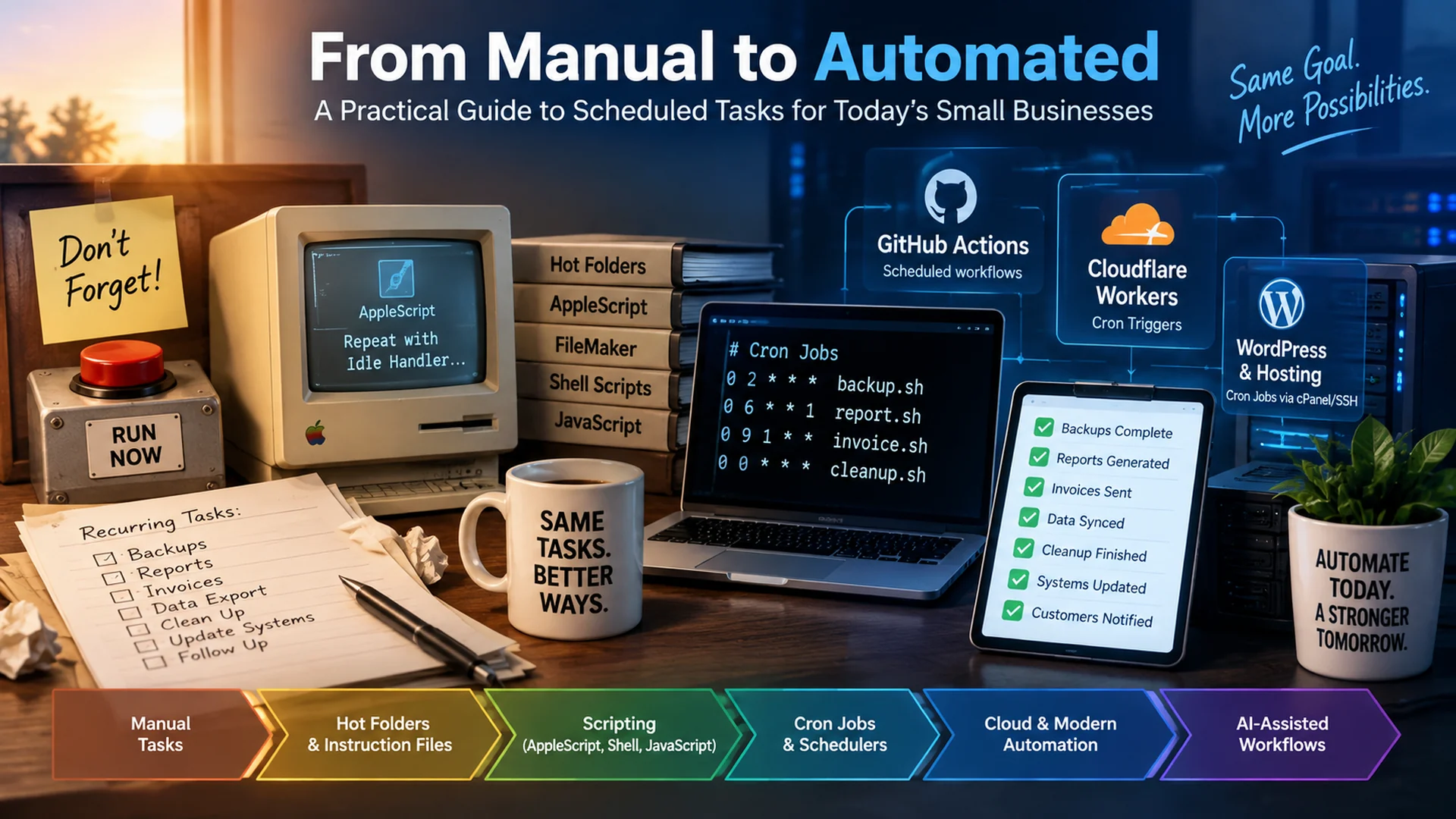
Long before artificial intelligence became part of everyday business conversations, I was building automated processes with hot folders, structured instruction files, AppleScript, FileMaker Pro, shell scripts, and eventually scheduled jobs.
Around 1995, I was introduced to AppleScript idle handlers. Instead of continuously running a repeat loop and checking whether something needed to happen, an AppleScript application could sit idle for a specified period, wake up, perform its instructions, and then return to waiting. To me, that was a big deal.
Even before idle handlers, I was working with what we called hot folders. A file arriving in a particular folder could become the trigger for another process. We also used hook files or instruction files, structured files containing information a script needed to determine what it should do next. Sometimes that information was returned as a list. Sometimes it was comma-delimited or tab-delimited.
Today I frequently work with Markdown files, configuration files, APIs, webhooks, cloud functions, and AI instructions. The technology has changed dramatically. The underlying idea has not: something happens, the system recognizes it, instructions are consumed, and work happens.
From Hot Folders to Cron Jobs to AI
My own progression looked something like this: hot folders → instruction files → repeat loops → idle handlers → date-based scheduling → shell scripts → cron jobs → event-driven cloud workflows → AI-assisted automation.
As my work became more sophisticated, I combined AppleScript and FileMaker Pro with date-based scheduling. Later came shell scripting, JavaScript, server automation, and cron jobs.
A cron job is simply a way to tell a computer to execute something according to a schedule: every night, every Monday, every 15 minutes, or on the first day of every month. The concept is straightforward: when this time arrives, do this.
Today, businesses can also use cloud and platform schedulers. GitHub Actions supports scheduled workflows using cron syntax. Cloudflare Workers supports Cron Triggers that invoke scheduled handlers. Many hosting environments expose traditional cron functionality. WordPress has WP-Cron, although it is triggered by page loads rather than running continuously like a system cron.
The tools have evolved. The business question remains remarkably similar: What are we still asking a person to remember to do that a machine could reliably handle?
Scheduled Automation Is a Business Issue, Not Just an IT Issue
This is where many small-business owners tune out too early. They hear words like cron, shell script, webhook, API, SSH, or scheduled handler and conclude that it is an IT thing.
The implementation may be technical. The problem is a business problem.
You do not need to know how to write a cron expression to recognize that someone on your staff spends 30 minutes every morning downloading a report, changing its format, moving it somewhere else, and notifying another employee that it is ready. You do not need to understand JavaScript to question why an important process stops when somebody goes on vacation.
Knowing how to automate something and knowing what should be automated are two different skills. Business owners need enough understanding to recognize what is possible and ask better questions.
A Real Situation That Made Me Ask the Question Again
I am currently involved with a client using a major electronic medical records platform. I am intentionally leaving the companies involved unnamed because the lesson matters more than the vendor.
We need offline data from the system. The information is sensitive, and the solution available to us is not a traditional API integration. Instead, data is populated into a spreadsheet that can then become part of another process.
We were told the process was automated. Naturally, I interpreted automation to mean the process would operate without somebody having to remember to start it every day.
What we observed was different. The data generally was not available early in the morning, and updates stopped during weekends. I cannot tell you exactly what is happening behind the scenes, and I am not going to pretend that I can. But I can evaluate the business result.
If the business requirement is for data to become available every day, including weekends, then an automated process that does not reliably produce that result is not satisfying the requirement.
Do Not Ask Whether It Is Automated. Define What Automated Means.
Now we have something measurable. It has a schedule, a deadline, an expected output, validation, and an exception process. That is much more useful than a checkbox labeled Automated: Yes.
The Five Questions I Would Ask About Automation
WHEN?
What starts the process? It might be a time, an event, or a condition. Every morning at 5:00 a.m. When a customer submits a form. When inventory falls below a threshold. This is the trigger.
WHAT?
What information does the process need? It might come from a spreadsheet, CRM, website, database, email, accounting platform, API, folder, or another business system.
THEN?
What is supposed to happen? Generate the report. Update the database. Create the invoice. Send the reminder. Move the file. Analyze the information. Notify the customer. Update the dashboard.
WHAT IF?
What happens when something does not go according to plan? Should the process retry, stop, alert someone, request approval, or roll back a change? This is where a simple scheduled task begins to become a mature workflow.
HOW DO WE KNOW?
How do we know the automation actually accomplished what the business expected? This may be the most overlooked question of all.
Automation Can Fail Quietly
One of the dangerous things about automation is that successful automation becomes invisible. Nobody thinks about the nightly backup, CRM sync, or Monday report because it is supposed to happen automatically. Until it does not.
A backup job could stop producing useful backups. A data import could process zero records. A CRM integration could stop moving leads. A reporting system could continue displaying stale numbers. A credential could expire. A process could technically execute successfully while producing an incorrect or empty result.
Technical Success vs. Business Success
Technical success means the process executed without reporting an error. Business success means the process produced the result the business actually needed. Those are not necessarily the same thing.
If a backup process executes successfully but creates an unusable backup, the business does not have a successful backup. If an import script runs without errors but imports zero records when hundreds were expected, the business does not have a successful import.
Do Not Just Automate the Job. Automate Knowing the Job Ran.
For important processes, I want more than a scheduler. I want evidence.
- when the process started and finished
- whether it completed
- how long it took
- how many records were processed
- whether the expected output exists
- whether the output falls within a reasonable range
- what happened when something went wrong
- who was notified
Some workflows should retry automatically. Some should stop. Some should notify a person. Some should require human approval before proceeding. The correct approach depends on the consequences of being wrong.
Cron Is Only One Kind of Trigger
Cron jobs are useful because time is one of the most common automation triggers. But time is not the only trigger. A process can begin because a file appeared, a form was submitted, an email arrived, a database record changed, an API delivered new information, a webhook fired, inventory reached a threshold, a payment became overdue, another workflow completed, or an unusual condition was detected.
When I was working with hot folders decades ago, the basic idea was: when this file appears, do this. A cron job says: when this time arrives, do this. A webhook can say: when this event occurs, do this.
Today's AI-assisted workflow can potentially say: when this happens, gather the relevant information, evaluate it, choose among permitted actions, act, verify the result, document what happened, and involve a person when necessary.
Where AI Changes the Middle
Traditional automation tends to be deterministic: Trigger → Script → Predefined Action.
AI can introduce an additional layer: Trigger → Gather → Analyze → Decide Within Boundaries → Act → Validate → Document → Escalate.
I think of this as bounded or semi-autonomous automation. The goal should not necessarily be to remove humans from the process. The goal is to decide where humans add value.
An AI system might gather information, compare results, identify anomalies, prepare a report, and recommend an action. It might execute certain low-risk actions independently. More consequential actions may still require human approval. Those boundaries should be designed intentionally.
What Should a Small Business Automate?
Automate tasks that are repetitive, predictable or rules-based, time-sensitive, and expensive to forget. Keep people involved when meaningful judgment, empathy, approval, security, or exception handling is required.
| Business Need | Possible Trigger | Possible Automated Action |
|---|---|---|
| Website backup | Every night | Back up files and database, then verify completion |
| Lead follow-up | New inquiry | Create CRM activity and start follow-up |
| Management reporting | Monday morning | Gather KPIs and prepare a report |
| Accounts receivable | Invoice becomes overdue | Send reminder or create staff task |
| Website maintenance | Scheduled interval | Run checks and report exceptions |
| Data synchronization | New data becomes available | Validate, process, and move data |
| AI reporting | Weekly schedule | Gather data, analyze changes, draft summary, flag anomalies |
GitHub Actions
Scheduled workflows using cron syntax
Cloudflare Workers
Cron Triggers that invoke scheduled handlers
Hosting environments
Traditional cron functionality
WordPress WP-Cron
Triggered by page loads
You May Already Have the Technology
Automation does not automatically require an expensive enterprise platform. Depending on the problem, a traditional hosting environment may provide cron jobs. WordPress has WP-Cron, and WordPress documents connecting it to a system task scheduler when timing is important. GitHub Actions can run scheduled workflows. Cloudflare Workers supports Cron Triggers. Hosting environments may provide SSH access for appropriately qualified developers to build server-side automation.
The specific tool should come after the business requirement. Do not start with, Should we use GitHub? Start with: What needs to happen, what should trigger it, and how will we know it worked? Then choose the appropriate technology.
You Do Not Need to Know How to Build It
You do not need to know cron syntax, AppleScript, JavaScript, SSH, API development, or Cloudflare Workers to benefit from automation. You need enough understanding to recognize the opportunity and ask better questions.
Look around your business and ask: What are people doing every day because somebody has to remember to do it? Then ask: Does somebody actually have to?
After that, look at the processes everyone already believes are automated and ask: How do we know they are actually working?
I Have Been Asking This Question Since the 1990s
When I discovered AppleScript idle handlers around 1995, AI was not part of the conversation. Cloud computing was not part of the conversation. We did not have today's APIs, serverless platforms, AI agents, or the enormous ecosystem of business automation tools available now.
But I was already trying to solve the same fundamental problem: How do I make the computer do this when it needs to happen instead of requiring me to sit there and tell it to start?
I moved from hot folders and instruction files to repeat loops, idle handlers, date-based scheduling, shell scripting, cron jobs, web technologies, cloud infrastructure, and now AI-assisted workflows.
The capabilities have changed dramatically. The question has not.
So when I encounter a routine digital process in 2026 that stops because nobody is working that day, I have a difficult time accepting, That's just how it works. I have been solving versions of this problem for more than 30 years. Technology can do considerably more today.
Find one thing in your business this week that happens every day, every week, or every month because somebody remembers to do it. Ask: Why is someone still pushing the button?
Then find something everyone believes is already automated. Ask: How do we know the button actually worked?
Ready to Find the Buttons Your Business Should Not Need to Push?
You do not need to know how to build the automation before you start the conversation. Start by identifying the repetitive process, what triggers it, what the expected result should be, and what happens when it fails.
Released Solutions can help you evaluate the process, determine what is realistically possible, and identify the technology and level of human oversight that make sense for your business.