
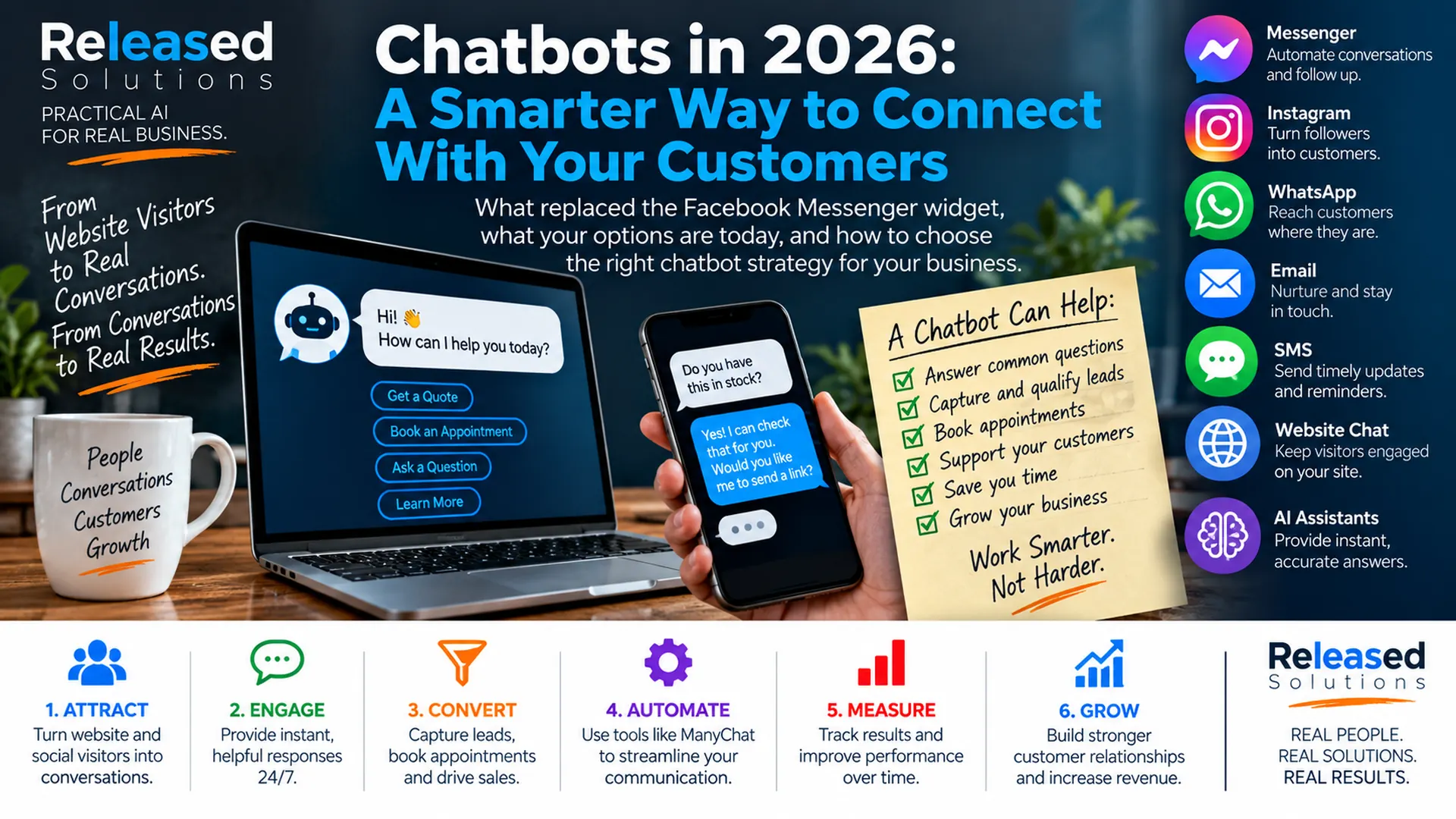

Chatbots in 2026: A Smarter Way for Small Businesses to Talk With Customers
Years ago, I showed businesses how to put Facebook Messenger directly on a website. That was useful at the time because it gave website visitors a familiar way to start a conversation without relying only on a contact form.
That specific approach has changed. Meta removed the website widget functionality that allowed businesses to initiate Messenger conversations from embedded Facebook website widgets. ManyChat documented that Meta ended the functionality beginning September 30, 2024 and removed the affected website widgets from ManyChat in November 2024.
But the bigger idea behind the old article is more relevant than ever. Customers still want convenient ways to ask questions, get help, check availability, book appointments, request quotes and decide what to do next. The difference is that a chatbot is no longer one Facebook widget. It can be part of a much larger customer conversation system.
My framework is: ATTRACT → ENGAGE → UNDERSTAND → ACT → HAND OFF → MEASURE. The goal is not to install a chat bubble. The goal is to make it easier for the customer and the business to have a useful conversation.
It is better conversations. The chat window is the interface. The strategy is what happens on either side of it.
First, What Do We Mean by Chatbot in 2026?
The word chatbot now covers several different technologies, and they are not interchangeable. The right solution depends on what conversation the business is trying to improve.
| Type of chatbot | What it does |
|---|---|
| Rule-based chatbot | Follows defined questions, buttons and decision trees. Best when the paths are already known. |
| Live chat | Connects the visitor to a real person through a website or app chat interface. |
| AI website assistant | Answers natural-language questions from approved business knowledge, qualifies leads and hands off to humans. |
| Social messaging automation | Automates conversations inside Messenger, Instagram, WhatsApp, Telegram, Email and SMS through platforms like ManyChat. |
Start with the conversation the customer is trying to have. Then choose the technology that makes it easier.
Conversation, Not Widget
A floating icon in the corner of the site is an interface. The chatbot is whatever the customer experience actually feels like.
System, Not Silo
The chatbot works with CRM, calendar, knowledge base and human team: not as an isolated plugin.
Handoff Is a Feature
Reaching a person quickly when the automation cannot help is part of good automation, not the opposite of it.
ATTRACT, ENGAGE, UNDERSTAND, ACT, HAND OFF, MEASURE
Ten Decisions That Shape a Modern Chatbot System
START WITH THE CUSTOMER CONVERSATION, NOT THE SOFTWARE
Before choosing a chatbot, ask what customers are actually trying to accomplish. Ask a common question, check availability, get pricing, request a quote, book an appointment, find a location, check an order, get technical help, talk to a person, find the right service. A chatbot should remove friction from one or more of those tasks. Start with the software feature list instead of the customer need and it is easy to build an impressive bot that nobody enjoys using.
WEBSITE CHAT IS STILL VERY MUCH ALIVE
The disappearance of Facebook's old Messenger website widget did not eliminate website chat. HubSpot, for example, currently supports rule-based chatbots that can qualify leads, book meetings or create support tickets, plus live chat and an AI customer agent that answers questions from business content and hands conversations to a human. Intercom similarly combines website chat with its Fin AI Agent and human support workflows. The modern replacement for the old widget may simply be a better website-native conversation experience.
MANYCHAT STILL MATTERS, BUT FOR A DIFFERENT REASON
ManyChat remains a useful example of social messaging automation. Its current platform supports automation across Messenger, Instagram, WhatsApp, Telegram, Email and SMS, depending on the account and plan. What changed is the website-widget relationship. Businesses can still use approaches such as Messenger referral links to move a visitor from a website into a Messenger conversation. That makes ManyChat less of a website chatbot replacement and more of a conversation automation layer for social and messaging channels.
AI ASSISTANTS CHANGED WHAT A CHATBOT CAN DO
Traditional bots work best when the customer stays inside the path the business designed. AI assistants can handle more natural questions like "Do you work with businesses like mine?" or "Which service do I need?" Modern AI customer agents can answer from approved knowledge, ask clarifying questions and in some systems perform actions or route the conversation. HubSpot's customer agent can answer, qualify leads and reassign to a human based on the configured handoff. Intercom's Fin is positioned similarly. See how to learn AI for small business for how to approach this.
AI NEEDS GOOD BUSINESS KNOWLEDGE
An AI chatbot is only as useful as the information and systems behind it. If the website is outdated, the service descriptions are unclear, policies conflict and the knowledge base is incomplete, the chatbot inherits those problems. Before asking AI to answer customers, make sure the business has reliable source material: service pages, product information, FAQs, policies, pricing rules where appropriate, location information, appointment instructions, knowledge-base articles, support documentation, CRM information the agent is permitted to use, and clear escalation rules. AI can make information easier to access. It cannot make inaccurate business information true.
CONNECT THE CONVERSATION TO CRM AND AUTOMATION
A chatbot becomes more valuable when the conversation does not disappear after the chat window closes. If someone asks for a quote, what happens next? If they want an appointment, can the system help schedule it? If they are a qualified lead, can the CRM capture the source and conversation? If a human needs to follow up, can a task be created? CHAT → CRM → FOLLOW-UP → OUTCOME. That is where a chatbot starts becoming part of the customer journey instead of another isolated website plugin.
HUMAN HANDOFF IS A FEATURE, NOT A FAILURE
One of the worst chatbot experiences is getting trapped inside automation when you clearly need a person. A good system should know when to stop: when the customer explicitly asks for a person, when the AI does not have enough confidence, when the issue involves an exception, when the customer is upset, when the conversation involves sensitive information, when a sales opportunity needs a human, when the request requires judgment or authorization. HubSpot's customer agent supports reassignment to human agents. Intercom emphasizes passing the conversation to the support team with context.
DIFFERENT CHANNELS HAVE DIFFERENT RULES
Messenger, Instagram, WhatsApp, SMS, email and website chat are not the same channel. Each platform has its own capabilities, permissions, policies and limitations, and those rules also change: the old Facebook website widget is a perfect example. Avoid building the entire customer communication strategy around one platform trick. Own the customer journey. Use platforms as channels inside it: see online presence management for how the pieces fit together.
PRIVACY, CONSENT AND TRUST MATTER MORE AS BOTS GET SMARTER
A chatbot may collect names, email addresses, phone numbers, questions, purchase information or other customer context. An AI assistant may also connect to business knowledge, CRM records or other systems. The business should understand what information is collected, why it is needed, where it is stored, which systems receive it, which employees or vendors can access it, what permissions apply to follow-up, and what the AI should never disclose or do. See what your business should retain control over for how to structure ownership.
MEASURE WHETHER THE CHATBOT IS HELPING THE BUSINESS
A thousand chatbot conversations do not automatically equal success. Measure what happens: conversations started, questions resolved, lead captures, qualified leads, appointments booked, quotes requested, human handoffs, support tickets avoided or resolved, conversion rate, customer satisfaction, abandonment, response time, and revenue or pipeline influenced when attribution supports it. Also read the conversations. The transcript can reveal questions customers repeatedly ask, confusing website content, missing services, sales objections and support problems.
The purpose of automation is not to prevent people from talking to your business. It is to use human attention where it creates the most value.
Which Type of Chatbot Does a Small Business Need?
Five common shapes cover most of the decisions. For many businesses, hybrid is where the market is going.
RULE-BASED
When the conversation is predictable, you want guided qualification, simple booking or routing, or a controlled decision tree.
LIVE CHAT
When customers need a real person, the sales process is consultative, questions vary widely or human judgment matters.
AI WEBSITE ASSISTANT
When you have useful business knowledge, customers ask many natural-language questions, you want 24/7 first-line assistance and a reliable human handoff.
SOCIAL MESSAGING AUTOMATION
When customers already engage heavily through Messenger, Instagram, WhatsApp or other supported channels: automate DMs, comment-triggered conversations, lead capture or follow-up.
HYBRID
When the business needs several of these at once. AI handles what it knows. Rules handle predictable processes. Automation moves information. CRM keeps the history. Humans handle what requires a human.
Where Released Solutions Fits
This is an area where small businesses often need help choosing the system before choosing the software. I can help evaluate what customers are trying to accomplish, whether the business needs website chat, social messaging automation, AI or a combination, what content the AI should use, how the chatbot should qualify and route leads, how CRM and customer relationships should connect, where human handoff belongs, and what should be measured. That can be handled as coaching for a business owner who wants to understand the system, or as one-time implementation and support where the business needs help getting the pieces connected. The goal is not to sell a chatbot. The goal is to create a better customer conversation.
ATTRACT: where does the conversation begin (website, search, social, ads, QR, email)? ENGAGE: what does the customer want to accomplish? UNDERSTAND: does the bot have the information and context needed to help? ACT: can it answer, qualify, book, route, capture or perform the next step? HAND OFF: when and how does a person take over? MEASURE: did the conversation produce a better customer experience or business result?
That is a chatbot strategy. A floating icon in the bottom-right corner is just an interface.
Website Chat
Rule-based, live chat and AI customer agents native to the site, tied into the same CRM the team already uses.
Social Messaging
Messenger, Instagram, WhatsApp, Telegram, Email and SMS automation for the channels customers already use.
AI + Knowledge
AI assistants grounded in accurate business content, with clear guardrails and human handoff.
Coaching or Support
Learn the options and build the system, or have Kenneth help select, configure, connect and test the workflow.
The Takeaway
Facebook Messenger on your website was once a useful tactic. That specific embedded-widget approach is gone. But the idea behind it evolved into something much larger.
Small businesses now have rule-based website bots, live chat, social messaging automation, AI customer agents, CRM-connected workflows and hybrid systems that can support customers from the first question through follow-up.
Do not begin by asking which chatbot is best. Begin by asking which customer conversations your business needs to improve.
Want Help Choosing or Building the Right Chatbot System?
Released Solutions can help small businesses evaluate website chat, AI assistants, social messaging automation, CRM integration and human handoff. Kenneth can work with the business through coaching or provide one-time implementation and support to connect the system around the actual customer journey.
Coaching: understand the options, map the customer conversations and build the system with guidance. One-time support: have Kenneth help select, configure, connect and test the chatbot and automation workflow.
Want Help Choosing or Building the Right Chatbot System?
Released Solutions can help small businesses evaluate website chat, AI assistants, social messaging automation, CRM integration and human handoff. Kenneth can work with the business through coaching or provide one-time implementation and support to connect the system around the actual customer journey.
Coaching: understand the options, map the customer conversations and build the system with guidance. One-time support: have Kenneth help select, configure, connect and test the chatbot and automation workflow.
Start with the conversation the customer is trying to have. Choose the technology afterward.
Kenneth Durrum, Released Solutions